
Repeat Orders & Your Account
Reordering customised workwear made simple
Ordering the same branded workwear again shouldn’t mean starting from the beginning.
Your My Custom Clothing account keeps your previous orders in one place and allows eligible customised products to be added back to your basket using the Reorder function.
You can then review the garments, quantities and customisation details before placing your new order.
A simpler way to order team workwear
Sign in to your account
Log in to the My Custom Clothing account used to place your previous order.
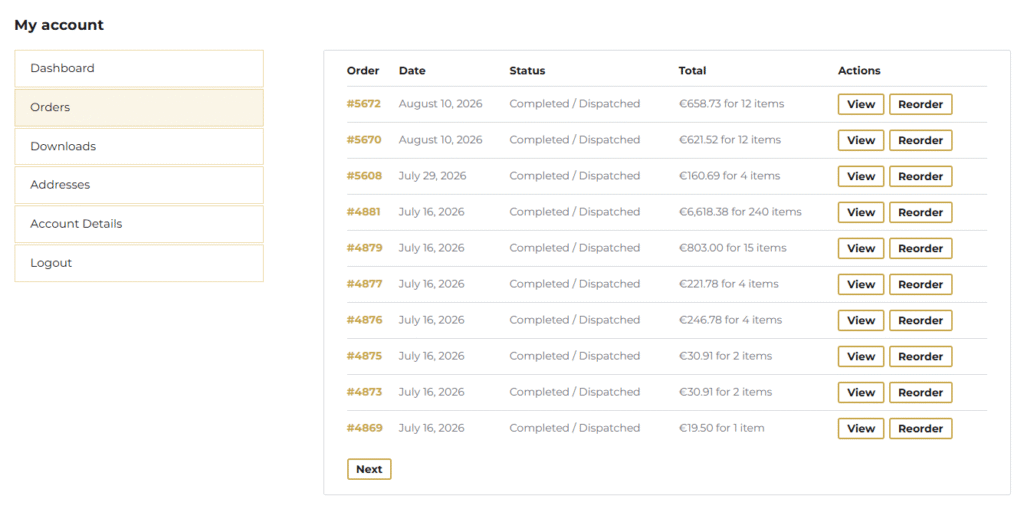
Open your previous orders
Go to:
My Account → Orders
Here you can view your previous orders and their current status.
Select Reorder
Where an order is eligible for repeat ordering, you will see a Reorder button.
Select this to add the previous garments and relevant customisation details back to your basket.
Review your basket
Check the products, quantities, sizes and branding information before proceeding.
You can adjust the required quantities for the new order where applicable.
Complete your new order
Proceed through checkout as normal.
The repeat order is treated as a new order, so current product availability, pricing, VAT, customisation rates and delivery rules apply.
Reuse your previously supplied artwork
If your company logo has already been supplied for a previous order, you do not normally need to upload it again.
When configuring another customised garment, choose Use previously supplied logo where available and select the relevant previous artwork.
Using the same previously supplied logo means another digitisation fee will not normally be required.
What can be carried into a reorder?
For eligible customised products, the reorder process can carry forward relevant configuration information from the previous order, including:
- garment and product selection;
- colour;
- fit where applicable;
- size;
- customisation method;
- branding positions;
- artwork references;
- text, job titles, names or initials where applicable.
Always review the new basket before checkout to make sure the repeat order still matches your requirements.
Can I change the quantities?
Yes.
A repeat order does not have to use exactly the same quantities as the original order.
Review the quantities required for the new order and make any necessary adjustments before checkout.
The applicable quantity pricing will be calculated using the quantities in the new order.
Current pricing and availability apply
Reordering a previous product does not reserve the original price or guarantee that every garment variation will still be available.
The new order uses the current:
- garment prices;
- embroidery and customisation rates;
- product and variation availability;
- VAT;
- and delivery rules.
If a previously ordered product, colour, fit or size is no longer available, you may need to select a suitable alternative.
Need to change the branding?
If you need more than a straightforward repeat order, you can configure the garment again using the normal product customiser.
This allows you to change the branding position; add additional branding positions; use different artwork; add names or initials; change text or job titles; or choose another garment.
Previously supplied artwork can still be selected where appropriate.
Your account
Your My Custom Clothing account also allows you to:
View previous orders
See your order history and access eligible repeat orders.
Manage your addresses
Keep your billing and delivery addresses up to date.
Update your account details
Manage your name, email address and account password.
Reuse previous artwork
Previously supplied logos can be selected again when placing future customised orders where available.
Need help with a repeat order?
If you are unsure which previous order to use, need help changing a configuration or cannot find the product you previously ordered, contact our team.
We’ll help you find the most suitable way to place your new order.